- Domains
- DNS Management
- Content Delivery Network
-
Cloud Containers
- Overview
-
Using Containers
- Creating and Managing
- Connecting to a Container
- Swapping the Image
- Domain Aliases
- Environment Variables
- Protected Environment Variables
- Backing Up
- Automatic Updates
- SSL Support
- Adjusting Execution Time Limits
- Upgrading Apache Image
- Renaming a Container
- Port Management
- Caching
- Cloning/Overwriting
- Restoring a Backup
- Production Mode
- Metrics Dashboard
- Accessing supervisord
- Container Deprecation
- SSH / SFTP Users
- Databases
- Volumes
- Custom Images
-
Technical Guides
- Create a NodeJS Container
- Creating a Service Container
- Working with .NET Core Web Containers
- Working with Node.js Web Containers
- Working with Umbraco Web Containers
- Deploying your application with git
- Python Container
- Enable Country-Level blocking in Cloud Containers
- Working with SQL Server Containers
- Working with the SilverStripe Caching folder
- Profiling a site using Xdebug on Cloud Containers
- Working with SilverStripe Containers
- NGINX Proxy for Service Containers
- Tuning PHP OPcache
- Deploying phpList on SiteHost Cloud Containers
- Deploying Mautic on SiteHost Cloud Containers
- Deploying n8n on SiteHost Cloud Containers
- Working with ModSecurity on Apache+PHP containers
- Google Tag Manager
- Low Disk Warnings & Upgrades
- Local Development
- Virtual Servers
- Dedicated Servers
- Private Cloud
- Cloud / Shared Hosting
- Email Hosting
- Monitoring & Bandwidth
- Account & Billing
- Developers
- SSL Certificates
- Networking
- AI Platform
Models
Outlining our models, there are a few key components for each model that define what you're able to do with them:
- Modality (text-only, multimodal) - whether the model supports image inputs.
- Context window - the maximum size the model's context window can reach. The longer the used window, the more tokens will be used and the slower requests will become.
- Instruction Trained - whether the model is designed to be used with instruction.
Inference
For general guidance on using inference endpoints, see inference.
Qwen 3.6 27B
- Multimodal
- 262K Context Window
- Instruction Trained
We serve Qwen 3.6 27B as our selected inference model. To use it in inference requests, use the model name Qwen/Qwen3.6-27B.
Qwen 3.6 does not need any special handling in our API. Using the recommended query structure for inference models will work as expected. By providing a 'system' input in chat templates, you will override the default system prompt. We strongly recommend providing a system prompt that guides the model on your specific use case (e.g. as a chatbot, with explicit guidance about your application/business).
Embedding
For general guidance on using embedding endpoints, see embeddings.
Additional to the standard model specifications, embedding models might support:
- Matryoshka - whether the model supports output dimension truncation.
- Max output dimensions - how many dimensions the default and maximum embedding generation is.
Qwen 3 VL Embedding 8B
- Multimodal
- 32K Context Window
- Instruction Trained
- Matryoshka
- 4096 Output Dimensions
Qwen 3 VL Embedding 8B is an instruction-aware multimodal embedding model. To use it, use the model name Qwen/Qwen3-VL-Embedding-8B
Because it is multimodal, it cannot be used with default inputs in the embedding batch endpoint.
As an instruction-aware model, embedding quality is highly dependent on the instruction (system prompt) provided. You may need to adapt these to suit your workload, but the default instruction for a document should be:
Represent the user's input.
For a query, the default should be:
Given a web search query, retrieve relevant passages that answer the query
Note that if you have a specific scope you will improve match quality by adjusting the prompts to match.
The full template for this model, for use if you would like to use the batching endpoint, is:
<|im_start|>system\n{INSTRUCTION}<|im_end|>\n<|im_start|>user\n{INPUT}<|im_end|>\n<|im_start|>assistant\nNote that the assistant section being left open is intentional.
Reranking
For general guidance on using reranking endpoints, see reranking.
Qwen 3 VL Reranker 8B
- Multimodal
- 32K Context Window
- Instruction Trained
Qwen 3 Reranker is an instruction-trained model designed to analyse, score and rerank a series of inputs against a given query. To use it in the API, use the model name Qwen/Qwen3-VL-Reranker-8B.
It is compatible with the standard reranking input structure, and should be used with the default instruction or a sensible variation for your use case: Given a search query, retrieve relevant candidates that answer the query
Trial Models
The landscape of small- to mid-sized models moves fast. We will on occasion offer a trial state for new models, which will show as distinct in the SiteHost Control Panel:
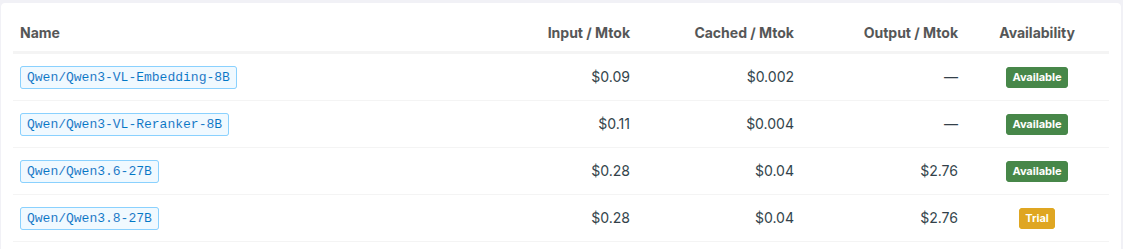
Trial models might be offered for both new models or in-place upgrade options (as in the example above, Qwen 3.8 is an in-place upgrade for Qwen 3.6). These may or may not be retained after the trial period, but running these trials allows us to gather some important data; what kind of demand we could expect, how our capacity management is likely to fare, and, in the case of in-place upgrades, whether the model is a suitable replacement for an existing supported model.
Pricing, performance, capabilities and availability are all subject to short-term change for trial models. Feel free to try them out to get a feel for how they fit your workloads, and let us know your feedback!