Inference
Our standard Inference service can be used with standard OpenAI-compatible endpoints:
/v1/completions: OpenAI Completions Documentation/v1/chat/completions: OpenAI Chat Documentation
Check the models page for info on our current model offerings.
Note that /v1/completions is considered legacy, and is used for one-off responses. It does not use the model's chat template (which is often what keeps everything sensible) and does not respect thinking/non-thinking parameters.
Any OpenAI-compatible client, including OpenAI's own Python package and coding harnesses such as OpenCode is compatible.
Streaming Responses
Streaming responses are available for inference models on chat/completions endpoints. The request structure is identical, beyond including a stream: true key in the body JSON. A streaming response will emit an SSE stream when available, complete when a [DONE] is emitted.
You can optionally request the backend includes usage with the following in your request body:
    "stream_options": {
      "include_usage": true,
      "continuous_usage_stats": true
    }
A streaming request/response will look something like:
❯ curl -N -X POST https://ai.sitehost.nz/v1/chat/completions -H "Authorization: Bearer YOUR_KEY_HERE" -H "Content-Type: application/json" -d '{
    "model": "MODEL_NAME",
    "messages": [
      {
        "role": "user",
        "content": "Hi there!"
      }
    ],
    "temperature": 0.7,
    "max_tokens": 100,
    "stream": true
  }'
data: {"id":"chatcmpl-sthai-841ec4c08a47f60531396e64216303c1","object":"chat.completion.chunk","created":1782956321,"model":"MODEL_NAME","choices":[{"index":0,"delta":{"role":"assistant","content":""},"logprobs":null,"finish_reason":null}],"prompt_token_ids":null,"prompt_text":null}

data: {"id":"chatcmpl-sthai-841ec4c08a47f60531396e64216303c1","object":"chat.completion.chunk","created":1782956321,"model":"MODEL_NAME","choices":[{"index":0,"delta":{"content":"Hello"},"logprobs":null,"finish_reason":null,"token_ids":null}]}

data: {"id":"chatcmpl-sthai-841ec4c08a47f60531396e64216303c1","object":"chat.completion.chunk","created":1782956321,"model":"MODEL_NAME","choices":[{"index":0,"delta":{"content":"! How can"},"logprobs":null,"finish_reason":null,"token_ids":null}]}

data: {"id":"chatcmpl-sthai-841ec4c08a47f60531396e64216303c1","object":"chat.completion.chunk","created":1782956321,"model":"MODEL_NAME","choices":[{"index":0,"delta":{"content":" I assist"},"logprobs":null,"finish_reason":null,"token_ids":null}]}

data: {"id":"chatcmpl-sthai-841ec4c08a47f60531396e64216303c1","object":"chat.completion.chunk","created":1782956321,"model":"MODEL_NAME","choices":[{"index":0,"delta":{"content":" you today?"},"logprobs":null,"finish_reason":null,"token_ids":null}]}

data: {"id":"chatcmpl-sthai-841ec4c08a47f60531396e64216303c1","object":"chat.completion.chunk","created":1782956321,"model":"MODEL_NAME","choices":[{"index":0,"delta":{"content":""},"logprobs":null,"finish_reason":"stop","stop_reason":null,"token_ids":null}],"system_fingerprint":"c03-infer-b"}

data: [DONE]
Streaming responses will still accrue partial usage if a request is cancelled partway through by the client.
Python OpenAI Client
You can use the Python OpenAI client to make requests against the SiteHost AI API:
from openai import OpenAI
from secrets import token_urlsafe

 # Reuse a session_id value across requests to pin to a backend and use the cache
session_id = token_urlsafe(24)
api_key = "YOUR_KEY_HERE"
base_url = "https://ai.sitehost.nz/v1"
model = "MODEL_NAME"

client = OpenAI(
    api_key=api_key,
    base_url=base_url,
    default_headers={
        "X-Session-ID": session_id
    },
)

response = client.chat.completions.create(
    model=model,
    messages=[{"role": "user", "content": "Hello there!"}],
    max_tokens=1000,
    extra_body={"chat_template_kwargs": {"enable_thinking": True}},
)

print(response.id)
print(response.system_fingerprint)
print(response.choices[0].message.content)
With this example, you should get a response similar to:
chatcmpl-sthai-ef3d2441f43a2e6e608deb3674ee9f51
c03-infer-a
Hello! How can I help you today?
OpenCode
To use SiteHost AI with OpenCode, you'll need to edit your opencode.json file (e.g. ~/.config/opencode/opencode.json) and add the following to the base level config (or slot the SiteHost part into your existing providers):
  "provider": {
    "SiteHost": {
      "npm": "@ai-sdk/openai-compatible",
      "name": "SiteHost",
      "options": {
        "baseURL": "https://ai.sitehost.nz/v1",
        "apiKey": "YOUR_KEY_HERE"
      },
      "models": {
        "MODEL_NAME": {
          "name": "Model Name"
        }
      }
    }
  },
Then, after opening/re-opening OpenCode, you should see the SiteHost provider and the configured model:

If your key is properly configured, you should be able to work with the model in question:
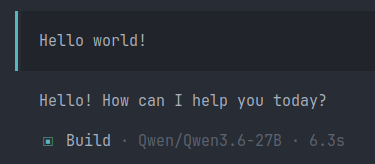
Keep in mind that mid-sized models can be impressive in their own right, but are not as capable as state-of-the-art offerings. As with any AI-assisted development, always verify generated code and output yourself.
Reasoning
Our inference API supports reasoning, where models emit a pre-response 'internal thought process' which can improve the quality of some responses. Reasoning can significantly increase the size of a response and therefore the number of output usage tokens, especially when you're aiming for a short response.
Our default behaviour is set to turn thinking off. However, if you want to turn it on (or want to be able to toggle it dynamically), use the {"chat_template_kwargs": {"enable_thinking": True}} parameter in your request body (extra_body key for the Python client).
System Prompt
We ship a near-default system prompt with models. This applies to chat/message chains that do not explicitly override the system prompt. It does not apply to the /v1/completions endpoint, where you need to provide a full system prompt for one-off responses.
Token Usage
Inference requests comprise of two primary components:
- Prefill - the sequence during which your inputs are computed into model-friendly inputs. This maps into your request's input token count, and as a byproduct, these computed input blocks are stored in the backend's Key-Value vector cache.
- Decode - the model runs over the computed inputs linearly and generates response tokens sequentially. The final total token count generated is your output token count. The model's reasoning, or 'thinking' process counts towards output tokens.
Prefill is the 'fast' part of the process, but it can also be cached across requests. If you're able to use session pinning to stick to a single backend server, you'll benefit from the cache's speed. We're working on exposing cached usage and pricing and we hope to be there soon - but in the meantime, session pinning will keep your requests fast.